AI Security
Microsoft Copilot readiness assessment
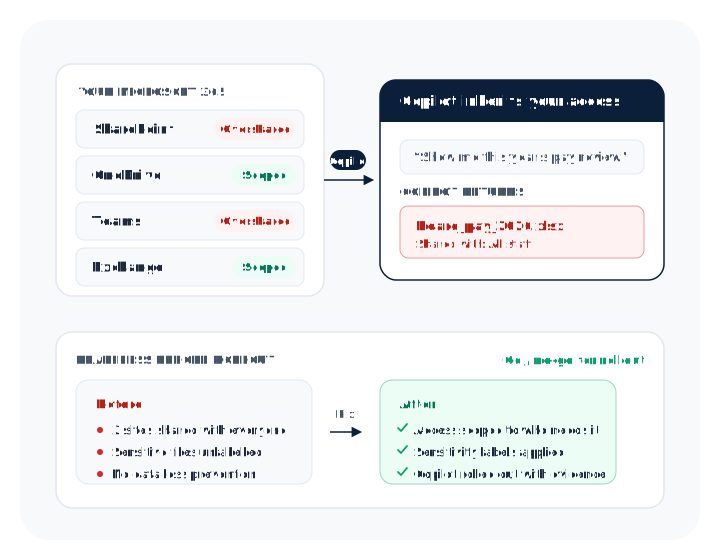
Microsoft 365 Copilot can see everything each member of staff can see. Switch it on over loose permissions and it will surface documents people were never meant to find. A readiness assessment finds that exposure and fixes it before rollout, so Copilot is useful on day one without becoming a data-leak engine.
Definition
What is a Copilot readiness assessment?
A Microsoft 365 Copilot readiness assessment is a review of your Microsoft 365 environment, carried out before you switch Copilot on, that establishes what Copilot would be able to surface to each member of staff and fixes the exposure first. It checks who can access what, how sensitive data is labelled and protected, and which content should be restricted or relabelled before Copilot can reach it.
The output is a prioritised list of the exposures Copilot would surface, the fixes to close them, and a clear go or no-go view for rollout. You move from "we think it is fine" to evidence, before the first prompt is typed.
Why now
Why Copilot needs a readiness check.
Copilot inherits each user’s existing access. If a mislabelled folder or an over-shared SharePoint site is readable by everyone, Copilot will happily quote it back to anyone who asks. The risk is not the AI, it is the access and labelling underneath it, and Copilot makes that pre-existing mess instantly searchable.
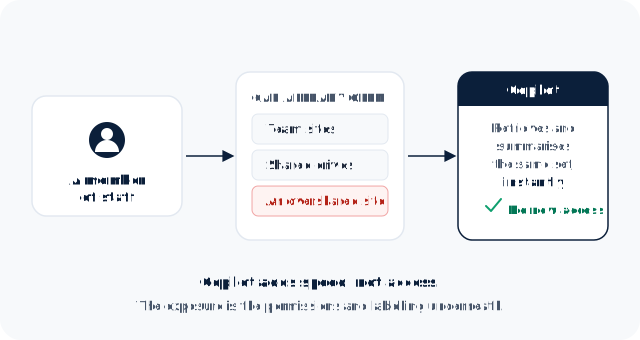
Copilot does not break your permissions, it works within them. Anything a user could already reach by searching, Copilot can retrieve and summarise in seconds. That is the point of the tool, and it is exactly why loose permissions that went unnoticed for years become a problem the moment Copilot is enabled.
Coverage
What the assessment covers.
The assessment is scoped against your tenant and covers the four things that decide whether Copilot is safe to roll out.
Access and oversharing review
Where permissions are broader than anyone intended across SharePoint, OneDrive and Teams: sites shared with "everyone" or "everyone except external users", broken permission inheritance, stale guest access, and the "shared with the whole company" links people forgot about.
Sensitivity labelling and classification
Whether sensitive content carries a sensitivity label, and whether those labels actually restrict what Copilot can use. Unlabelled confidential data is the most common gap, because Copilot treats it like anything else it can read.
Data loss prevention readiness
Whether Microsoft Purview data loss prevention is in place to stop sensitive information being surfaced or exfiltrated, and where policy coverage has gaps.
Licensing and a staged rollout plan
Which users are in scope, the pilot group to start with, and a phased plan so you turn Copilot on for people whose data is ready, not for everyone at once.
The problem
Where oversharing comes from.
Oversharing is rarely deliberate. It builds up quietly over years of normal work, and nobody notices until a tool like Copilot makes every document findable at once.
- Legacy SharePoint sites set up years ago with open permissions and never tidied.
- "Share with everyone" and company-wide links created for convenience and forgotten.
- Broken permission inheritance, where a restricted folder quietly became readable.
- Guest and external access that outlived the project it was granted for.
- Copies of sensitive files scattered across personal OneDrives and Teams chats.
The controls
The controls that make Copilot safe.
Making Copilot safe is mostly about getting the Microsoft 365 controls right before rollout, not about the AI itself. The native tools in Microsoft Purview do most of the work.
- Sensitivity labels that classify data and restrict what Copilot can use.
- Data loss prevention policies that stop sensitive content being surfaced or shared.
- Access tidied so each site, library and file is open to the people who need it.
- Restricted SharePoint search and content controls for the sites that are not ready yet.
- Retention and lifecycle rules so old, stale content is not in scope at all.
Output
What you get.
You finish the assessment with evidence, not an opinion: a clear picture of the exposure, the fixes to close it, and a decision you can defend to your board.
- A prioritised list of the exposures Copilot would surface, ranked by risk.
- The specific fixes to close each one, in Microsoft 365 and Purview.
- A sensitivity-labelling and data loss prevention starting point.
- A pilot group and a staged rollout plan.
- A clear go or no-go view for rollout, with the evidence behind it.
Rollout
A staged rollout, not a switch.
1.Fix the exposure
Close the oversharing, label the sensitive content and put data loss prevention in place for the areas in scope.
2.Pilot with a ready group
Enable Copilot for a small group whose data is in good shape, and watch what it surfaces in practice.
3.Expand with evidence
Widen the rollout as each part of the estate is made ready, rather than turning it on for everyone and hoping.
4.Keep it current
Permissions and data drift as people work, so oversharing is checked on a cadence, not once.
Delivery
How it is delivered.
The assessment is delivered with specialist Microsoft 365 and Purview practitioners we select and oversee, with Threat Protect as your single point of accountability. You get one team from scoping to the go or no-go, and the findings feed into how you govern AI across the organisation rather than sitting in a one-off report.
Governance
How it fits with AI governance.
Copilot readiness is the data-protection half of adopting AI safely. The policy half, who can use what and under which rules, is our AI governance work. Most organisations need both, and an AI policy that covers Copilot use should land alongside the rollout.
FAQ
Questions buyers actually ask
What is a Copilot readiness assessment?
It is a review of your Microsoft 365 environment before you enable Copilot, checking who can access what, how data is labelled and protected, and what Copilot would be able to surface. It produces a prioritised list of fixes and a go or no-go view for rollout.Can Copilot expose confidential data?
It can, if the underlying permissions allow it. Copilot does not break access rules, it uses them, so anything a user could already reach by searching, Copilot can retrieve and summarise instantly. Loose permissions and mislabelled data are the real exposure.How long does a readiness assessment take?
For most mid-sized organisations, a focused assessment takes a small number of weeks, depending on the size of the Microsoft 365 estate and the state of permissions and labelling. We scope it against your tenant before we start.Do we need Microsoft Purview?
Not to start, but you will need a way to label and protect sensitive data, and Purview is the native route in Microsoft 365. The assessment tells you what to put in place, whether or not it is switched on today.Does Microsoft 365 Copilot train on our data?
No. Microsoft states that your prompts, responses and the data Copilot accesses through the Microsoft Graph are not used to train the underlying foundation models, and your data stays within your Microsoft 365 service boundary. The risk a readiness assessment addresses is different: what Copilot can surface to your own staff through existing permissions.What is oversharing in SharePoint?
Oversharing is content that is accessible to more people than anyone intended, usually because a site was shared with "everyone", a link was made company-wide, or permission inheritance broke. It is harmless until a tool makes it easy to find. Copilot does exactly that, which is why oversharing is the main thing a readiness assessment looks for.Should we run a pilot before rolling Copilot out fully?
Yes. Enable Copilot for a small group whose data is already in good shape, watch what it surfaces in practice, and widen the rollout as each part of the estate is made ready. A staged rollout is far safer than turning it on for everyone at once.Can we restrict what Copilot is able to see?
Yes. Sensitivity labels, data loss prevention, access changes, restricted SharePoint search and retention rules all narrow what Copilot can use. The assessment sets out which of these to apply, and to which parts of the estate, before rollout.
Check before you switch Copilot on.
Tell us about your Microsoft 365 estate. We will find what Copilot would surface, and the fixes to close it, before your rollout.
Book a call